

How I Saved 3 Hours a Week Automating My Substack Notes — and How You Can Too
What 1,500 Notes taught me about creating faster, scheduling smarter, and staying consistent


A year ago, I thought spending four hours every weekend writing Posts and manually posting Notes was a normal part of growing a newsletter.
If you’ve ever felt like your weekend disappears into formatting and posting, this story will feel familiar.
Open Substack. Write. Copy. Paste. Format. Post. Repeat.
It felt like a productive way to build my newsletter on the side, as I had a demanding 9-to-5 job that took up most of my attention during the weekdays.
After tracking my time for a few weeks, I realized I was losing three hours every week on tasks that software could handle more efficiently than I could.
So I fixed it.
Here’s how I went from wasting 156 hours - almost one month of work - on scheduling and posting 1,500 Notes effortlessly — and what I learned in the process.
The Pain of Manual Posting
When I started writing on Substack, I treated Notes like tiny experiments — short, conversational posts that helped me connect with readers on a daily basis.
Over time, those Notes became a big part of my workflow. I’ve now posted more than 1,500 Notes, each one a small piece of a bigger conversation.
But the process was painfully manual back then.
If you’ve ever opened Substack intending to publish a quick Note — and found yourself still tweaking formatting 20 minutes later — that was me, every day.
Every week, I’d copy text from my drafts folder in Obsidian, paste it to Substack, fix formatting quirks, re-add images and emojis, paste links, and manually post each Note.
Then, one Friday night, while writing my draft Notes, I realized I had spent three hours that week just copying, pasting, and formatting.
The Breaking Point
I analyzed how much time I spent researching, creating, and writing content, and realized that my Note publishing process was flawed.
While I spent 4 hours each weekend on my long-form posts, my weekdays were hijacked by interrupt-driven note-writing and responding to readers’ comments after my day job, or sometimes in the middle of the night if I got paged during my on-call duty.
If I couldn’t sleep after fixing a production issue at 2 AM, I would spend hours responding to my readers’ comments or posts.
I wasn’t being productive; I was just being busier and closer to burnout.
That’s the hidden trap for most creators — the time you spend managing your content often grows faster than the time you spend creating it.
I knew I couldn’t scale my writing habit if every Note felt like manual labor. So I decided to fix the bottleneck — once and for all.
The Fix: Automated Note Scheduling
Over the Thanksgiving holiday in 2024, I stumbled on a Notes thread where creators were complaining about the lack of scheduled Notes.
I realized that by batching my note writing and scheduling a week's worth of Notes, I could be much more productive over the weekends.
So, I built a small Notes Scheduler tool to alleviate the pain. Over the last 12 months, that small tool has evolved to Substack Pro Studio based on feedback from hundreds of active users.
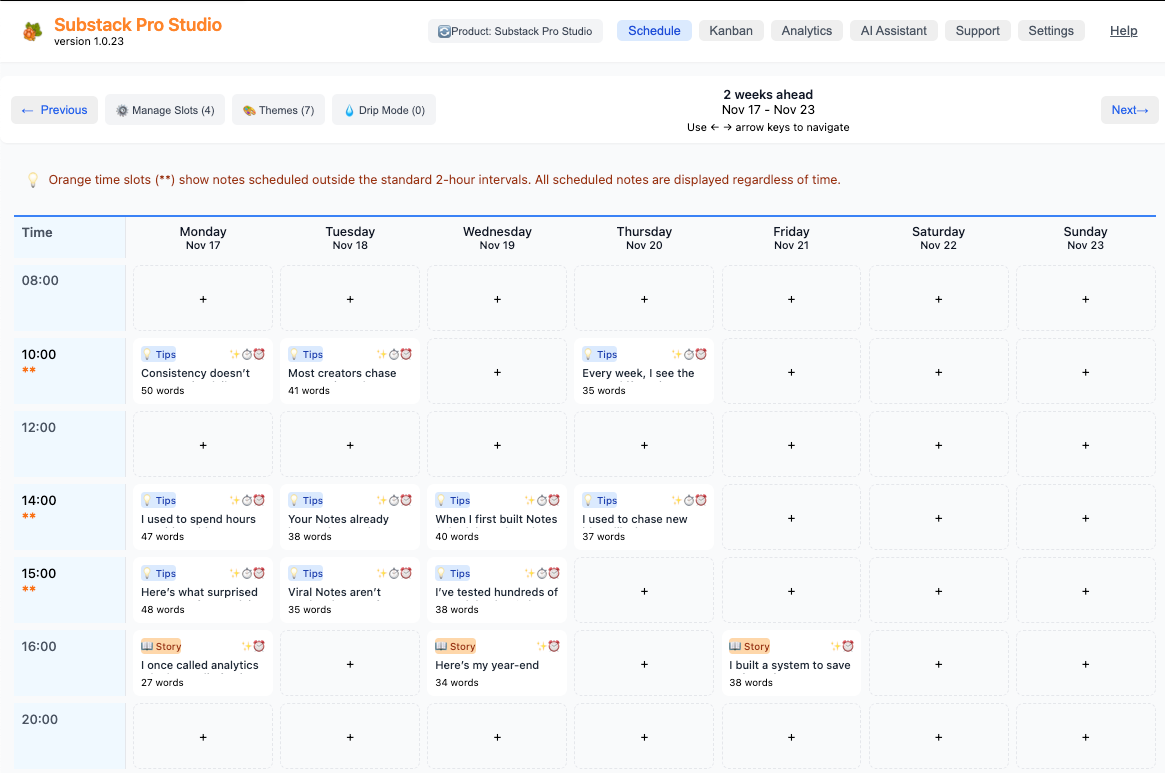
Now, I write my Notes once a week. The tool automatically scheduled them on Substack — right when I want them to go out.
Here’s what changed:
Before automation:
Edit note and copy/paste text into Substack
Reformat images and emojis
Add links manually
Post every day
After automation:
Use Analytics and AI Assistant to create topics and themes to write about
Create and edit my draft Notes for the week in one batch
Click “Schedule All”
Done in under 10 minutes
The best part? My Notes still sound like me.
Automation didn’t erase my voice — it removed the noise.
The Ripple Effect
The impact was bigger than I expected.
Saving three hours a week meant:
I could spend more time researching and writing long-form posts.
I could analyze performance and engagement more deeply.
I could spend more time building new tools for writers
I could actually take weekends off.
But there was also a subtle shift: I became more consistent.
Because scheduling was no longer a mental hurdle, my posting rhythm improved.
And consistency — more than anything — drives engagement on Substack.
The real win wasn’t just time saved. It was attention gained — 2,809 followers and 1,125 subscribers after I started from zero in August 2024.
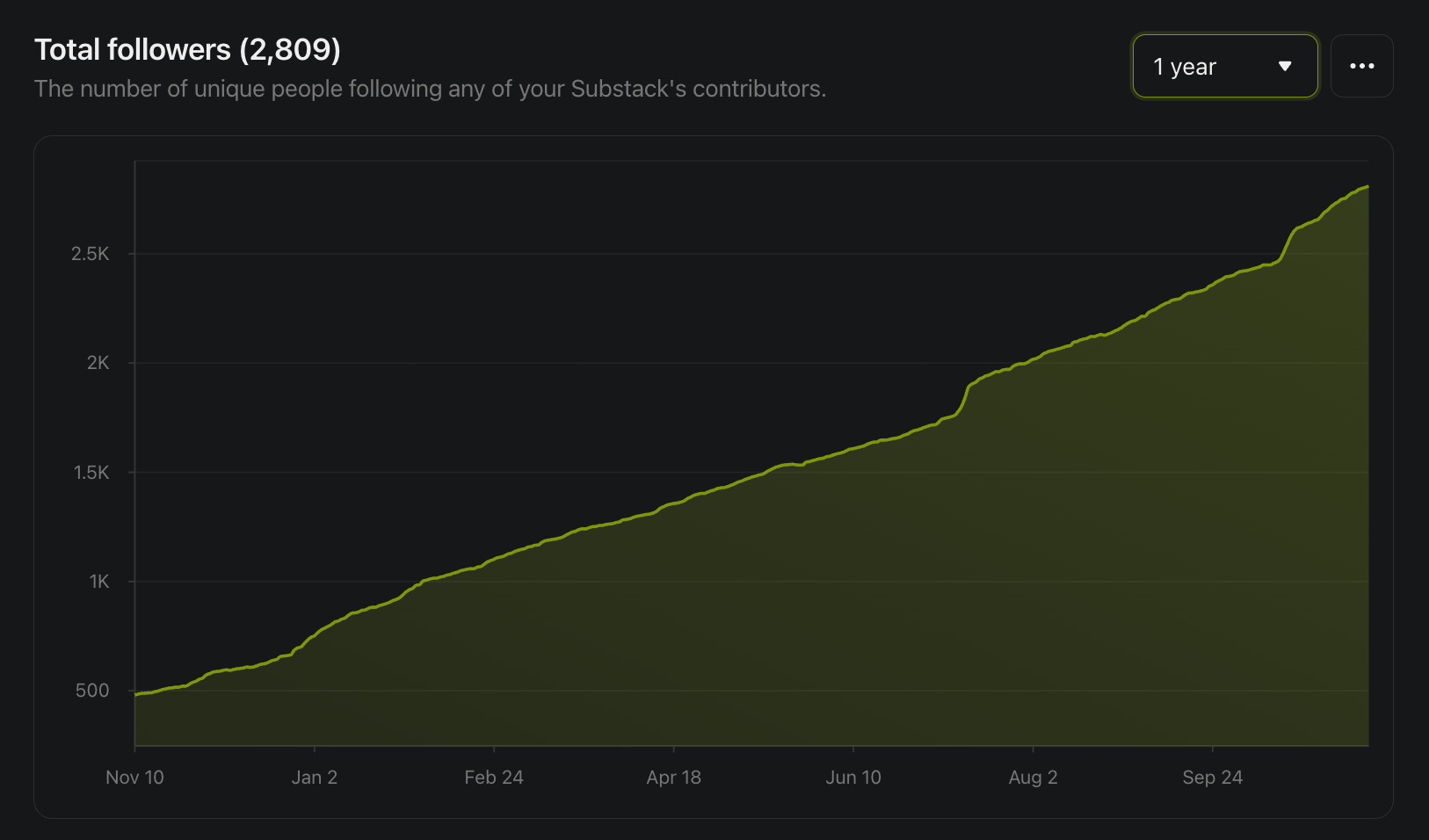
If you’re publishing regularly, these benefits compound fast. You’ll show up more consistently — and your readers will start showing up for you.
My Takeaway
Automation gets a bad rap among creators.
People assume it kills authenticity.
However, for me, it had the opposite effect — it brought my focus back to what matters most — writing.
Automation doesn’t make your work less human. It just removes the friction between your ideas and your audience.
Want to Try It?
If you’re curious how this works, here’s a video demo showing how I plan a week’s worth of 24 high-quality Notes in under 5 minutes.
Or, skip straight to the fun part — try the Substack Pro Studio risk-free for 30 days and see how much time you reclaim.
BLACK FRIDAY SPECIAL OFFER: Use the code Z3NOENF at checkout to get a 35% discount until Nov 30th, 2025, 23:59 EST.
Want to know more? Here is the Substack Pro Studio User Guide, which provides detailed descriptions of all the tool functionality designed to help writers save time, find their audience, and grow their newsletters.
I can't wait to try this. Haven't bought it yet. Is there any way to use the code with the GPT bundle version?
Great post, Finn. I'm using your PRO product and I highly recommend it. Of course, I generally edit the notes I get from CHAT, but that's quick. And, my experience with you, Finn, for customer support has been A+. Thank you again. Blue